Seismic Exchange
Storylane-icon

Storylane

Create and share interactive demos directly within Seismic

Description

  • Storylane brings interactive product experiences directly into your Seismic workflow. Instead of relying on static screenshots or long videos, teams can deliver guided, hands-on demos that buyers can explore inside Seismic with no friction.
  • This integration lets Sales, Marketing, and Customer Success teams embed Storylane demos into Seismic content, share them with prospects, and track engagement across both platforms. Users can instantly surface the right demo, launch it in a single click, and deliver tailored walkthroughs that accelerate deal cycles.
  • By combining interactive demos with Seismic’s sales content, Storylane helps deliver clearer product value, shorten discovery, and give prospects a hands-on experience much earlier in the buying journey.

How this app works

Storylane integrates with Seismic to centralize, organize, and deliver interactive product demos. Teams can browse their Storylane library inside Seismic, copy demo URLs and add them to their WorkSpace, and then use these URLs within Digital Sales Rooms. This streamlines demo delivery, and gives sellers clearer insight into buyer engagement:
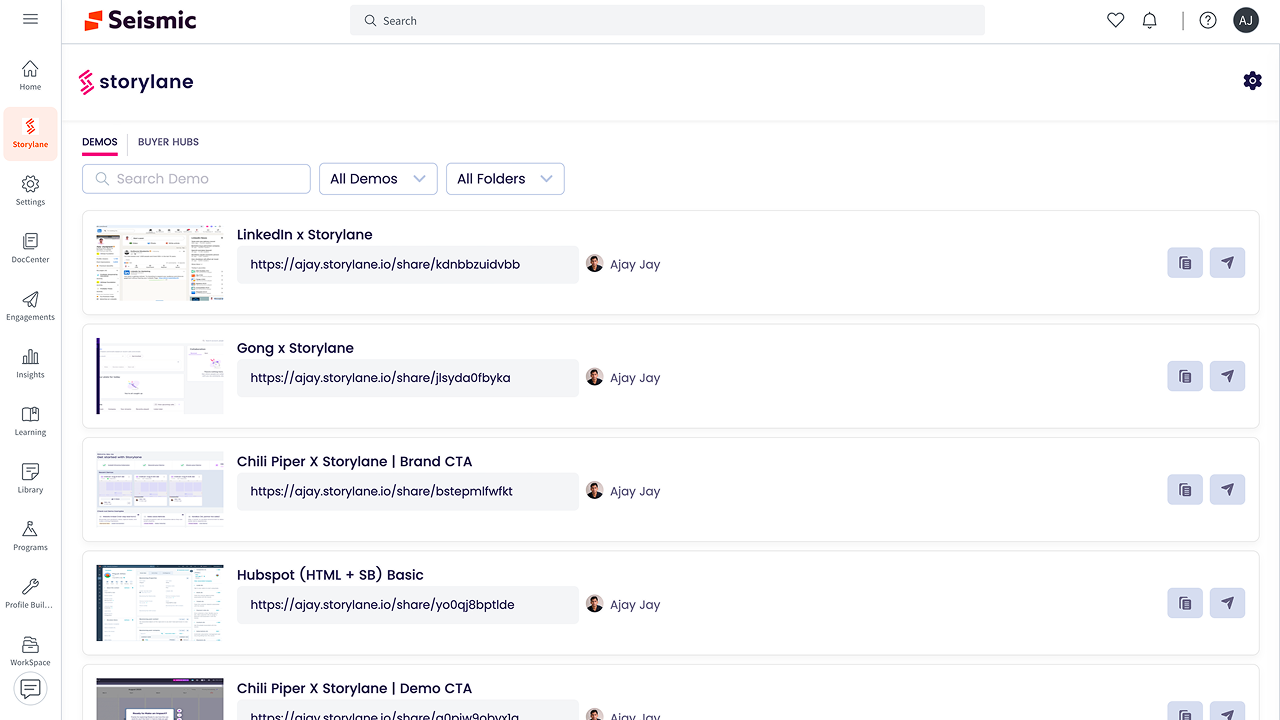
  • Access Storylane demos inside Seismic: From the Seismic sidebar, users can open the Storylane tab to view their full demo library. Published demos appear in a structured list with search, filters, and sharing options. Teams can copy links or launch demos without leaving Seismic, using Storylane in tandem with other content information from Seismic.
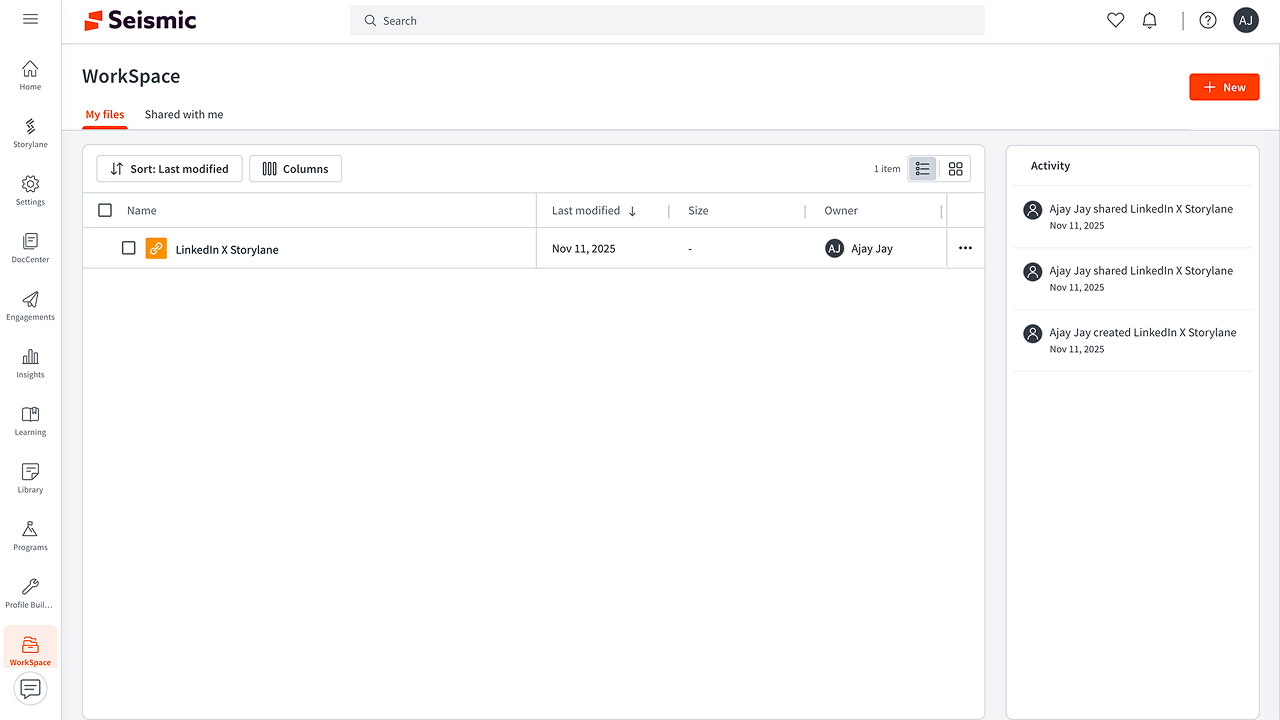
  • Add Storylane demos to WorkSpace: Users can save Storylane demos into WorkSpace like any other Seismic asset. Saved demos can be shared, organized by deal or region, and tracked through Seismic’s collaboration tools while still powered by Storylane interactivity.
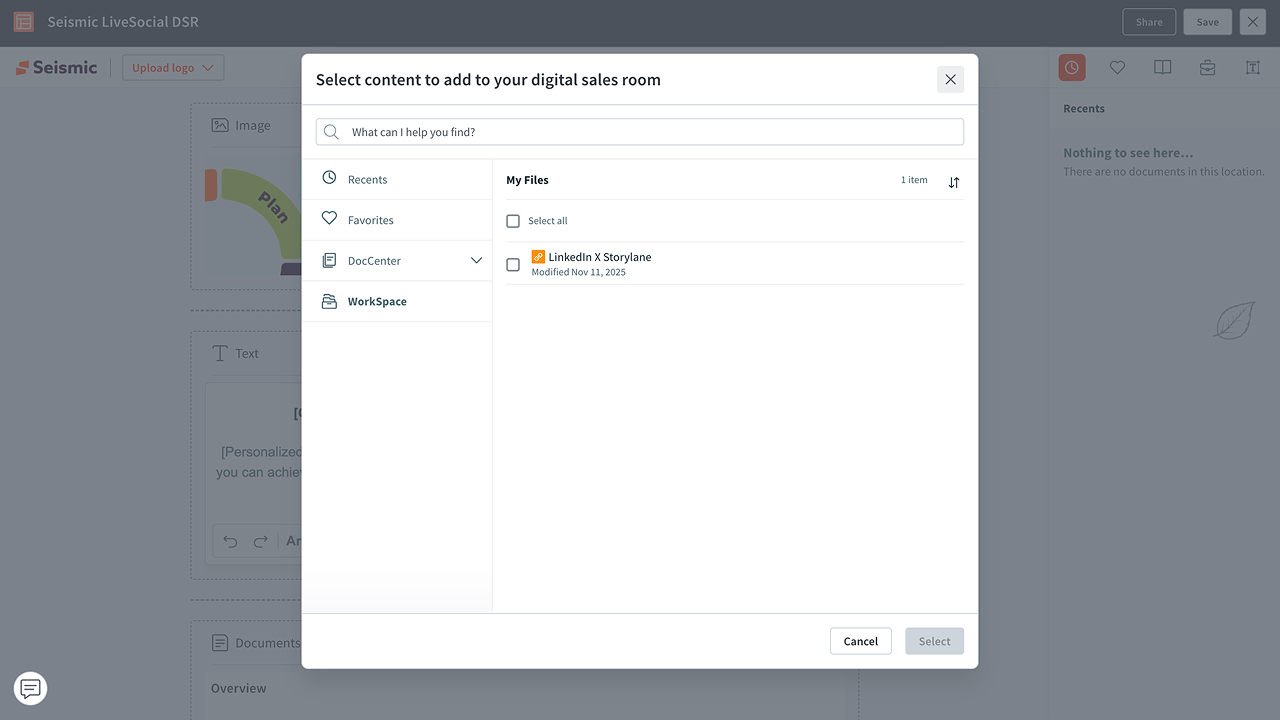
  • Embed Storylane demos in Digital Sales Rooms: When building a Digital Sales Room, Storylane demos appear as selectable assets. Sellers can embed guides, interactive demos directly into the DSR to give buyers a hands-on, self-paced product exper

Key Features
  1. Embed Interactive Demos in Seismic: Add Storylane demos alongside Seismic content so sellers can instantly present live product experiences to buyers.
  2. Personalized Demo Experience: Customize demos by persona, vertical, account, or stage. Tailor messages, UI highlights, and flows to each buyer.
  3. On-Demand Buyer Exploration: Empower prospects to self-navigate guided product experiences at their own pace inside Seismic Sales Enablement and Digital Sales Room
Prerequisites
  1. Active Storylane Account - Users must have an active Storylane workspace with published demos ready for sharing. Any Storylane plan that supports demo creation and sharing is compatible.
  2. Seismic User Account - A valid Seismic login with access to WorkSpace, Digital Sales Rooms, or other areas where Storylane demos will be used.
  3. Enabled Storylane Integration in Seismic - the Storylane app must be installed from the Seismic App Exchange and enabled by a Seismic administrator:
    • Appropriate permissions depending on your organization
    • Permission to add content to workspace
    • Permission to create or manage Digital Sales Rooms
    • Admin approval for third party integrations
Categories
Marketing
Voice & Video
Education & Training
File & Content Management
Sales Engagement
Sales Readiness
Version
1.0.0
Developer
Storylane
Have A Question?

Storylane's team is here to help with any question you have about their app.

Storylane-icon

Storylane

Create and share interactive demos directly within Seismic

General Information

Description

  • Storylane brings interactive product experiences directly into your Seismic workflow. Instead of relying on static screenshots or long videos, teams can deliver guided, hands-on demos that buyers can explore inside Seismic with no friction.
  • This integration lets Sales, Marketing, and Customer Success teams embed Storylane demos into Seismic content, share them with prospects, and track engagement across both platforms. Users can instantly surface the right demo, launch it in a single click, and deliver tailored walkthroughs that accelerate deal cycles.
  • By combining interactive demos with Seismic’s sales content, Storylane helps deliver clearer product value, shorten discovery, and give prospects a hands-on experience much earlier in the buying journey.

How this app works

Storylane integrates with Seismic to centralize, organize, and deliver interactive product demos. Teams can browse their Storylane library inside Seismic, copy demo URLs and add them to their WorkSpace, and then use these URLs within Digital Sales Rooms. This streamlines demo delivery, and gives sellers clearer insight into buyer engagement:
  • Access Storylane demos inside Seismic: From the Seismic sidebar, users can open the Storylane tab to view their full demo library. Published demos appear in a structured list with search, filters, and sharing options. Teams can copy links or launch demos without leaving Seismic, using Storylane in tandem with other content information from Seismic.
  • Add Storylane demos to WorkSpace: Users can save Storylane demos into WorkSpace like any other Seismic asset. Saved demos can be shared, organized by deal or region, and tracked through Seismic’s collaboration tools while still powered by Storylane interactivity.
  • Embed Storylane demos in Digital Sales Rooms: When building a Digital Sales Room, Storylane demos appear as selectable assets. Sellers can embed guides, interactive demos directly into the DSR to give buyers a hands-on, self-paced product exper

Key Features
  1. Embed Interactive Demos in Seismic: Add Storylane demos alongside Seismic content so sellers can instantly present live product experiences to buyers.
  2. Personalized Demo Experience: Customize demos by persona, vertical, account, or stage. Tailor messages, UI highlights, and flows to each buyer.
  3. On-Demand Buyer Exploration: Empower prospects to self-navigate guided product experiences at their own pace inside Seismic Sales Enablement and Digital Sales Room
Prerequisites
  1. Active Storylane Account - Users must have an active Storylane workspace with published demos ready for sharing. Any Storylane plan that supports demo creation and sharing is compatible.
  2. Seismic User Account - A valid Seismic login with access to WorkSpace, Digital Sales Rooms, or other areas where Storylane demos will be used.
  3. Enabled Storylane Integration in Seismic - the Storylane app must be installed from the Seismic App Exchange and enabled by a Seismic administrator:
    • Appropriate permissions depending on your organization
    • Permission to add content to workspace
    • Permission to create or manage Digital Sales Rooms
    • Admin approval for third party integrations
Categories
Marketing
Voice & Video
Education & Training
File & Content Management
Sales Engagement
Sales Readiness

Developer
Storylane
Have A Question?

Storylane's team is here to help with any question you have about their app.


Additional Information
/* istanbul ignore next */